You are paying Shopify every month for the plan, a stack of apps and, if you use your own payment provider, an extra fee on every order. WooCommerce looks cheaper and gives you more control. What stops most store owners is the move itself: lost rankings, broken links, customers who cannot log in, and a launch week that eats sales.
This guide covers a Shopify to WooCommerce migration from the money side: what it costs using public prices, what moves cleanly, what breaks, and the order of work that protects your rankings. Every platform fact links to the platform’s own documentation.
Short answer: A Shopify to WooCommerce migration moves your products, customers, orders and content into a self-hosted WooCommerce store, then redirects every old Shopify URL to its new address. The data import is the easy part. Customer passwords never transfer, apps and themes must be rebuilt, and your rankings depend on a complete 301 redirect map.
Key takeaways
- Shopify exports products, customers and orders as CSV files. Product images are linked by URL, not packed inside the file, so they need their own transfer.
- Customer passwords cannot be migrated. Plan password reset emails before launch, not after the complaints.
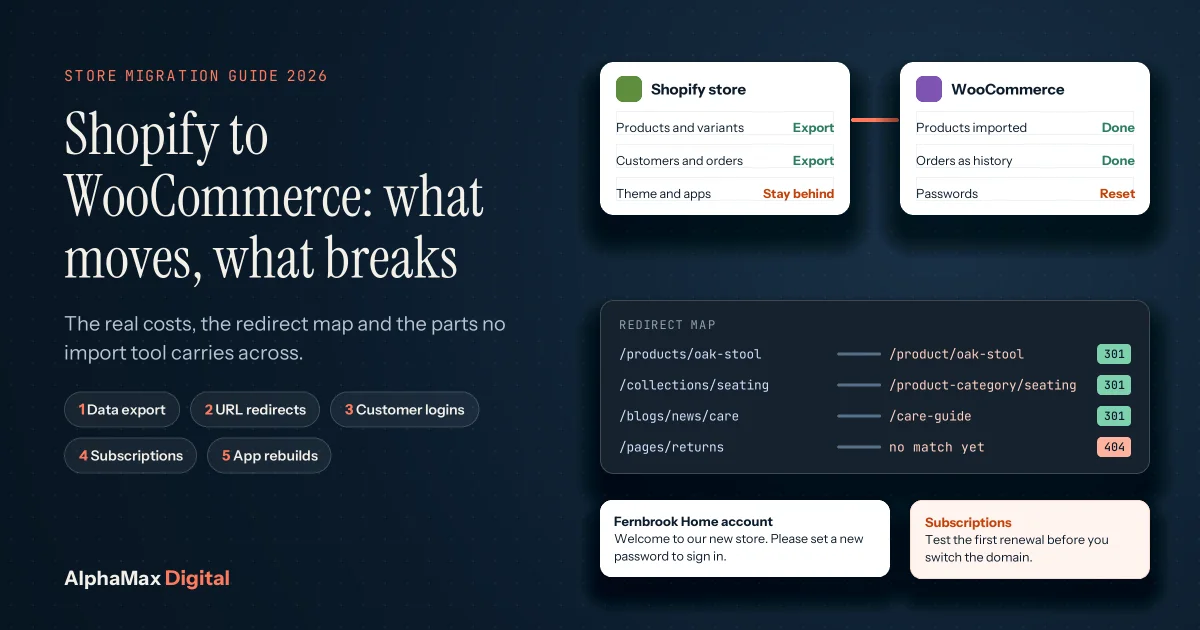
- Shopify uses /products/item and WooCommerce uses /product/item by default, so every product, collection, blog and page URL needs a 301 redirect.
- The official Migrate & Import Shopify to WooCommerce extension is listed at $79 a year on the WooCommerce Marketplace (checked 23 November 2026). Software is the cheap part. Checking data, redirects and rebuilding apps is where the time goes.
- Google says to keep redirects for at least a year, and that a medium-sized site can take a few weeks or more to settle in search.
- If you sell subscriptions, test a real renewal before you switch the domain.
Is it worth moving from Shopify to WooCommerce?
It is worth it when Shopify’s fees and app limits cost you more each year than running WooCommerce would, or when you need control Shopify does not give you. It is not worth it if your store is small, you depend on Shopify-only features, or nobody will look after a self-hosted site.
Start with the fee most owners forget. Shopify’s pricing page (checked 23 November 2026) lists a third-party transaction fee of 2% on Basic, 1% on Grow and 0.6% on Advanced when you use a payment provider other than Shopify Payments. WooCommerce has no platform fee on orders. You still pay a payment processor on both platforms.
Here is a worked example using those published rates. Say your store takes $40,000 a month online on Shopify Basic and runs payments through PayPal or Stripe instead of Shopify Payments:
- 2% of $40,000 is $800 a month, or $9,600 a year, in Shopify’s third-party fee alone.
- On Grow at 1%, the same sales cost $4,800 a year in that fee.
- Both figures come before the payment provider’s own charges and before app subscriptions.
If you already use Shopify Payments, this fee does not apply to you, and the case for moving rests on app costs, control and SEO instead. Our guide to what Shopify transaction fees cost per year goes deeper, and the Shopify migration cost calculator runs your own numbers.
Move if: you pay a third-party transaction fee on high sales, you pay for several apps that do jobs WordPress plugins do once, you need custom product, checkout or content features, or you want full control of URLs and page structure (see Shopify vs WooCommerce for SEO).
Stay if: your fees are small, you rely on Shopify POS or Shopify-only sales channels, or the real problem is a store that does not convert. Moving a slow, confusing store just moves the problem. In that case, fix the store you have first.
What moves from Shopify to WooCommerce, and what doesn’t?
Products, customers, orders, coupons, blog posts and pages can all move. Passwords, apps, your theme and working subscription renewals do not move by themselves. This table is built from WooCommerce’s Shopify migration guide (updated 17 November 2026) and the Shopify Data Migrator documentation.
| Store data | Moves? | What to watch |
|---|---|---|
| Products, variants, prices, stock | Yes | Images are linked by URL in the Shopify CSV, not included in it. Copy them before you close Shopify. |
| Collections | Yes, as product categories | Compare product counts in every category against Shopify. |
| Customers | Yes | Passwords never transfer. Customers must reset them. |
| Orders | Yes, as order history | Check totals, dates and statuses on a sample of orders. |
| Discount codes | Yes, with a migration extension | Test each code’s rules at checkout. |
| Blog posts and pages | Yes, with a migration extension | Internal links inside the content still point to Shopify URLs. Update them. |
| Product reviews | Sometimes | Depends on your review app’s export and the tool you use. |
| SEO titles and descriptions | Check after import | WooCommerce’s guide says to confirm migrated meta titles in an SEO plugin such as Yoast. |
| Theme | No | The Shopify theme download holds Liquid templates. The design is rebuilt in a WordPress theme. |
| Apps | No | List what each app does, then replace it with a plugin, a built-in feature or custom code. |
| Subscriptions | Records may move | WooCommerce warns that importing customers and orders alone does not confirm future renewals will work. |
Two rows cause most of the post-launch support emails. First, passwords: WooCommerce’s guide says it “cannot import hashed passwords from Shopify, so customers will need to reset their passwords after migration.” Second, subscriptions: confirm with your migration provider and payment gateway which subscription records and saved payment methods can transfer, then test the renewal flow before launch.
How much does a Shopify to WooCommerce migration cost?
The software can cost less than $100 a year. The real cost is the hours spent checking data, rebuilding apps and design, and mapping redirects, whether those hours are yours or a provider’s. Here is every cost line to budget for.
| Cost line | Typical form | Public price or note |
|---|---|---|
| Migration tool | Yearly licence, or free CSV route | Migrate & Import Shopify to WooCommerce: $79 a year (checked 23 November 2026) |
| Hosting | Monthly | Varies by host. Check it meets WooCommerce’s server requirements. |
| Theme and design | One-time | Free theme, paid theme or custom build |
| App replacements | One-time or yearly | One plugin or custom feature per app job |
| Payment processing | Per order | WooPayments: 2.9% + $0.30 per US card; 1.5% + £0.25 per UK card for UK stores (checked 23 November 2026) |
| Redirects and SEO checks | Hours | The free Redirection plugin handles the rules. The mapping is the work. |
| Upkeep after launch | Monthly | Updates, backups and security, done by you or a care plan |
| What you stop paying | Monthly | Shopify plan, Shopify app subscriptions and any third-party transaction fee |
The honest comparison is a year of Shopify (plan, apps, fees) against a year of WooCommerce (hosting, licences, upkeep) plus the one-time move. If the yearly saving does not pay back the move in a reasonable time, stay where you are.
Not sure the move pays for itself?
Get a free Profit Leak Assessment first. It shows where your store loses money today, so you can tell whether the platform is the problem or the store is.
DIY, migration plugin or migration service: which route fits?
A small catalogue with simple products can move with free CSV tools. Most stores do better with a migration extension. Stores where a bad launch would cost real money should pay for a service that owns the redirect map and testing.
| Route | Best for | You still handle | Main risk |
|---|---|---|---|
| Manual CSV import (free) | Small catalogue, few variants, no subscriptions | Column mapping, images, customers and orders through free plugins | Missed fields and broken images |
| Migration extension | Most stores with a standard setup | Hosting, design, app replacements, redirects, testing | The tool moves data, not your URLs or apps |
| Migration service | Stores with real organic traffic, subscriptions or custom features | Approving the redirect map and testing orders | Picking a provider that skips SEO checks |
If you hire help, ask these questions before you sign:
- Will I see the full old-to-new URL map before launch?
- How will customers be told to reset their passwords, and when?
- How will you test a subscription renewal, if I have subscriptions?
- Which apps will you replace, and with what?
- Who checks Search Console for 404 errors in the weeks after launch?
- Will I own the hosting account, the domain and every login?
A provider who cannot answer the first question is moving data, not migrating a store.
How do you migrate from Shopify to WooCommerce without losing SEO?
Map every old URL to one new URL before launch, redirect with 301s on the day you switch, then watch Search Console for errors. Google’s site move guide (last updated 20 August 2026) states that 301 and other permanent redirects do not cause a loss in PageRank. Rankings drop when redirects are missing or wrong.
- List every Shopify URL. Start with your sitemap at yourstore.com/sitemap.xml, then add your top pages from Search Console and analytics. Google says to include image and video URLs too.
- Build WooCommerce on a staging site. Shopify keeps selling while you build. If you block indexing during the build, write down what to unblock on launch day.
- Import in order and count. Products first, then customers, then orders. Compare record counts and spot-check variants against Shopify.
- Map old to new. /products/oak-stool goes to /product/oak-stool, /collections/seating to the matching category, blog posts and pages to their new homes. Send each URL straight to its final page. Google advises against redirect chains.
- Carry over the SEO details. Titles, meta descriptions, image alt text and a self-referencing canonical on each new page. Update internal links so they point at new URLs, not redirects.
- Test checkout. Place test orders with each payment method, a failed card, a discount code and each shipping zone, as WooCommerce’s guide recommends.
- Switch at a quiet time. Point the domain at the new store, turn on redirects and submit the new sitemap. Keep the same domain: Google advises changing one thing at a time.
- Watch and keep. Check Search Console for “Not found” errors daily in the first weeks. Keep the redirects for at least a year, as Google recommends.
For a printable version, use our Shopify migration checklist.
How long does a Shopify to WooCommerce migration take?
There are two clocks. The build and data move usually take one to two weeks for a standard store. Google then needs a few weeks or more to replace old URLs with new ones in search.
On our side, most migrations take 7 to 14 days, depending on catalogue size and custom features, as set out on our Shopify migration service page. Google’s site move guide says that for medium-sized websites it “can take a few weeks or more” for Google to start showing the new URLs, and longer for large sites. Expect some ranking movement in that window. Plan the switch away from your busiest sales weeks.
FAQ
Can customers keep their passwords when you move from Shopify to WooCommerce?
No. Shopify does not release customer password data, so no tool can move it. Customer accounts arrive without working passwords, and customers set a new one through password reset. Send a clear email on launch day so returning buyers are not stuck at checkout.
Can I migrate from Shopify to WooCommerce for free?
Yes. WooCommerce’s own guide walks through a manual CSV import for products and free plugins for customers and orders. It costs time instead of money, and you still need to copy images, rebuild the design, replace apps and set up redirects.
Will I lose my Google rankings if I switch from Shopify to WooCommerce?
You should not lose them for good if every old URL has a 301 redirect to the right new page. Google says permanent redirects do not lose PageRank, but expect temporary movement while Google recrawls. Missing or wrong redirects are what cause lasting drops.
How long should I keep redirects after the migration?
At least one year, according to Google’s site move guide. That gives Google time to move all signals, including links from other sites, to the new URLs. For visitors, Google suggests keeping them for as long as possible.
Is WooCommerce cheaper than Shopify?
Often, but not always. WooCommerce has no platform fee on orders, while Shopify charges 2%, 1% or 0.6% on its main plans if you use a payment provider other than Shopify Payments. WooCommerce adds hosting, plugin licences and upkeep. Compare a full year of both before deciding.
When can I close my Shopify store?
After the new store is live, every image is copied, and your exports and record counts are checked. Product images in the Shopify CSV point to Shopify-hosted URLs, so copy them before you cancel. Keep your exported CSV files as a backup.
Thinking about a move? Start with the free Profit Leak Assessment, then see how our Shopify to WooCommerce migration service and WooCommerce development work.
Written by Michael Caleb Nnaleche, founder of AlphaMax Digital Services. Background in computer science, web development, eCommerce conversion and SEO. Prices and fees were checked on the Shopify, WooCommerce and WooPayments pages linked above on 23 November 2026 and can change. Last updated: 23 November 2026.