Most eCommerce owners know they need SEO. Fewer know that content and links will underperform if the technical foundations underneath them are broken.
A technical SEO audit examines those foundations. Not the keywords you are targeting. Not the copy on your product pages. The structural layer that determines whether search engines can find, crawl, understand, and rank your store in the first place.
This guide covers exactly what a technical SEO audit includes, why each area matters for eCommerce stores specifically, and what you should do with the findings once you have them.
Quick Answer: What Does a Technical SEO Audit Cover?
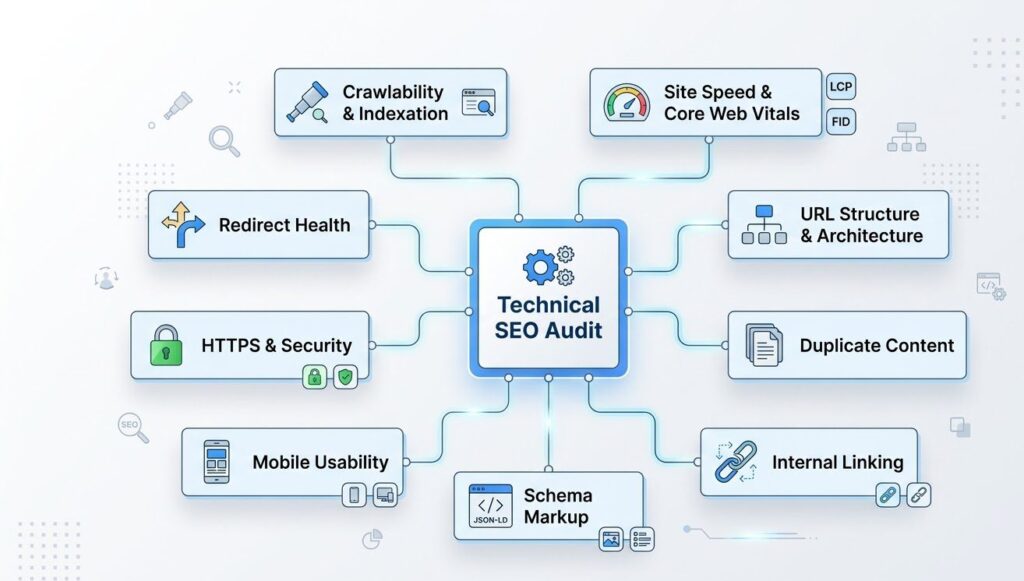
A technical SEO audit examines the structural and configuration layer of a website. It covers crawlability, indexation, site speed and Core Web Vitals, URL structure, duplicate content, internal linking, schema markup, mobile usability, HTTPS and security signals, and redirect health. The output is a prioritised list of issues with severity ratings and recommended fixes. For eCommerce stores, the audit also covers product and category page configuration.
1. Crawlability and Indexation
Before any other SEO work matters, search engines need to be able to find and read your pages.
A technical audit checks:
- Whether your robots.txt file is blocking pages that should be indexed
- Whether key pages (category pages, product pages, landing pages) are included in your XML sitemap
- Whether your sitemap is submitted to Google Search Console and free of errors
- Whether any pages are marked noindex unintentionally
- Whether the Googlebot crawl log shows pages being skipped or returning errors
For eCommerce stores, this area often reveals that large portions of the catalog are either blocked or not being crawled efficiently. A 5,000-product store with a crawl budget issue will see only a fraction of its pages indexed at any time.
2. Site Speed and Core Web Vitals
Google uses Core Web Vitals as a ranking signal. Three metrics are assessed:
- LCP (Largest Contentful Paint): How quickly the main visible content loads. Target: under 2.5 seconds.
- INP (Interaction to Next Paint): How responsive the page is to user interaction. Target: under 200ms.
- CLS (Cumulative Layout Shift): Whether elements shift unexpectedly as the page loads. Target: under 0.1.
The audit checks these scores across key page types: homepage, category pages, product pages, and checkout. It also identifies the causes: unoptimised images, render-blocking scripts, third-party tag overload, or a theme with excessive unused CSS.
For eCommerce stores, product pages are the most common failure point. Large image files and multiple tracking scripts compound the load time on pages that need to convert.
3. URL Structure and Architecture
A clean URL structure tells search engines how your content is organised and which pages are most important.
The audit checks:
- Whether URLs are readable and descriptive (e.g. /category/mens-running-shoes/ vs /cat?id=442)
- Whether the category and subcategory hierarchy is logical and consistent
- Whether product URLs are nested correctly under their category
- Whether session IDs, tracking parameters, or other dynamic strings are being appended to URLs and creating duplicate versions
URL structure issues are common in stores that have grown organically without a planned architecture. Products moved between categories, renamed without redirects, or duplicated across multiple category paths create a messy crawl environment that dilutes authority.
4. Duplicate Content and Canonicalisation
Duplicate content is one of the most common technical SEO problems in eCommerce, and one of the least visible to store owners.
It typically comes from:
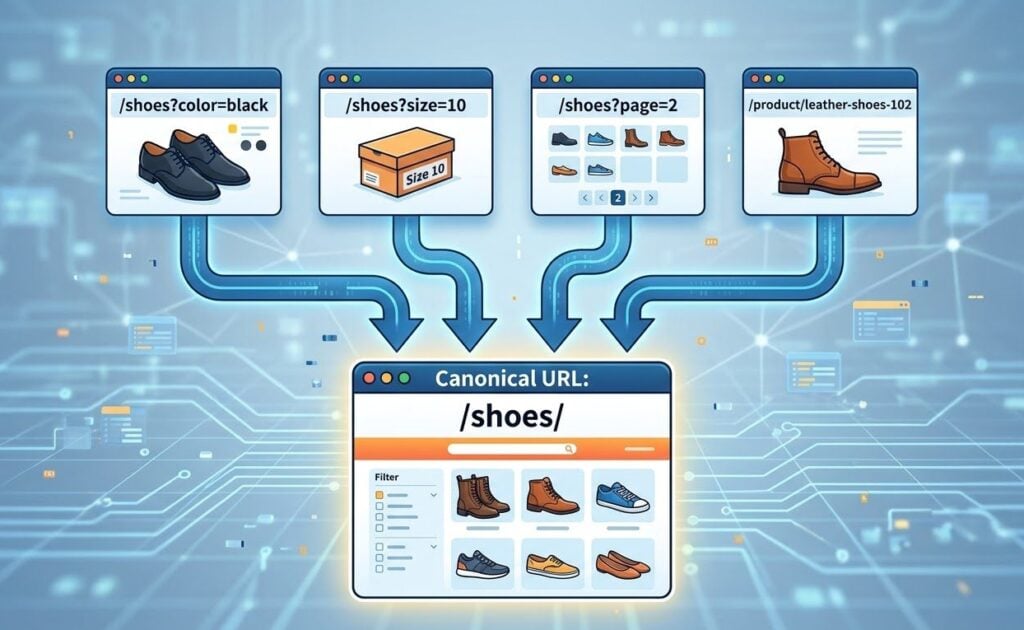
- Product variants (e.g. the same product in different sizes or colours generating separate URLs)
- Faceted navigation (filter combinations like /shoes?colour=black&size=10 creating thousands of near-identical URLs)
- Pagination handled without canonical tags
- www and non-www versions of pages both being accessible
- HTTP and HTTPS versions both returning a 200 status
The audit identifies all duplicate content sources, checks whether canonical tags are correctly configured, and flags where self-referencing canonicals are missing or pointing to the wrong page.
For stores with large catalogs and filter-heavy navigation, this area of the audit typically produces the longest findings list.
5. Internal Linking
Internal links serve two purposes. They help users navigate the store. They also distribute link authority from high-authority pages (like the homepage) to the pages that need ranking support (like category and product pages).
The audit checks:
- Whether key category and product pages receive internal links from other pages on the site
- Whether anchor text is descriptive and varied (not just “click here”)
- Whether any important pages are orphaned, meaning they exist but no other page links to them
- Whether the link depth from the homepage to key pages is reasonable (ideally three clicks or fewer)
- Whether there are broken internal links returning 404 errors
Weak internal linking is a silent ranking problem. A category page with strong content and no internal links will underperform compared to a weaker page that is well-linked from across the site.
6. Schema Markup and Structured Data
Schema markup is code added to pages that tells search engines exactly what the content represents. For eCommerce stores, it enables rich results: star ratings, pricing, availability, and review counts appearing directly in search listings.
The audit checks:
- Whether Product schema is implemented on product pages, including price, availability, and review properties
- Whether BreadcrumbList schema is present and accurate
- Whether Organization schema is configured on the homepage
- Whether FAQPage schema is applied to FAQ sections
- Whether any schema contains errors or missing required properties (checked against Google’s Rich Results Test)
Missing or broken schema does not prevent ranking. But it does prevent your listings from standing out in search results, which affects click-through rate even when your position is strong.
7. Mobile Usability
Mobile-first indexing means Google primarily uses the mobile version of your site to determine rankings. If the mobile experience is degraded, your rankings reflect that.
The audit checks:
- Whether text is readable without zooming
- Whether tap targets (buttons, links) are an appropriate size and spacing
- Whether content extends beyond the viewport horizontally
- Whether interstitials or pop-ups block content on mobile in a way that Google flags
- Whether mobile page speed scores are within acceptable range (they are typically lower than desktop and need separate attention)
This check uses a combination of Google Search Console’s mobile usability report and manual review of key page types on multiple viewport sizes.
8. HTTPS, Security, and Trust Signals
An HTTP page on an eCommerce store is a conversion problem as well as a ranking problem. Browsers display security warnings on non-HTTPS pages, which customers see before they purchase.
The audit checks:
- Whether the entire site is served over HTTPS
- Whether any mixed content warnings exist (HTTP assets loading on HTTPS pages)
- Whether the SSL certificate is valid and not approaching expiry
- Whether the site is included in any known malware or spam blocklists (checked via Google Search Console’s Security Issues report)
These issues are typically quick to resolve but can be invisible until they cause a direct problem. An expired certificate will break the site entirely for visitors and trigger immediate ranking drops.
9. Redirects and Broken Links
Every broken link or missing redirect is a dead end for both users and search engines.
The audit checks:
- 404 errors across the site, including pages that have been deleted or moved without redirects
- Redirect chains (A redirects to B which redirects to C) that dilute link authority
- Redirect loops that prevent pages from loading
- External links pointing to 404 pages that previously had authority
For stores that have undergone previous redesigns or platform migrations without proper redirect mapping, this section of the audit typically reveals significant link equity loss that can be partially recovered.
10. eCommerce-Specific Checks
Beyond the standard technical checks, eCommerce stores require additional review of:
- Faceted navigation handling: How filter and sort URLs are managed to prevent crawl budget waste
- Pagination: Whether page 2, 3, 4 of category listings are indexed or excluded appropriately
- Out-of-stock product pages: Whether discontinued products are handled with redirects, 410 status codes, or kept live with alternative product suggestions
- Checkout and cart pages: Whether these are excluded from indexation (they should be)
- Hreflang implementation: For stores serving multiple regions or languages
These eCommerce-specific issues are where the most commercially significant findings often appear, because they affect the pages closest to purchase intent.
What the Audit Output Should Look Like
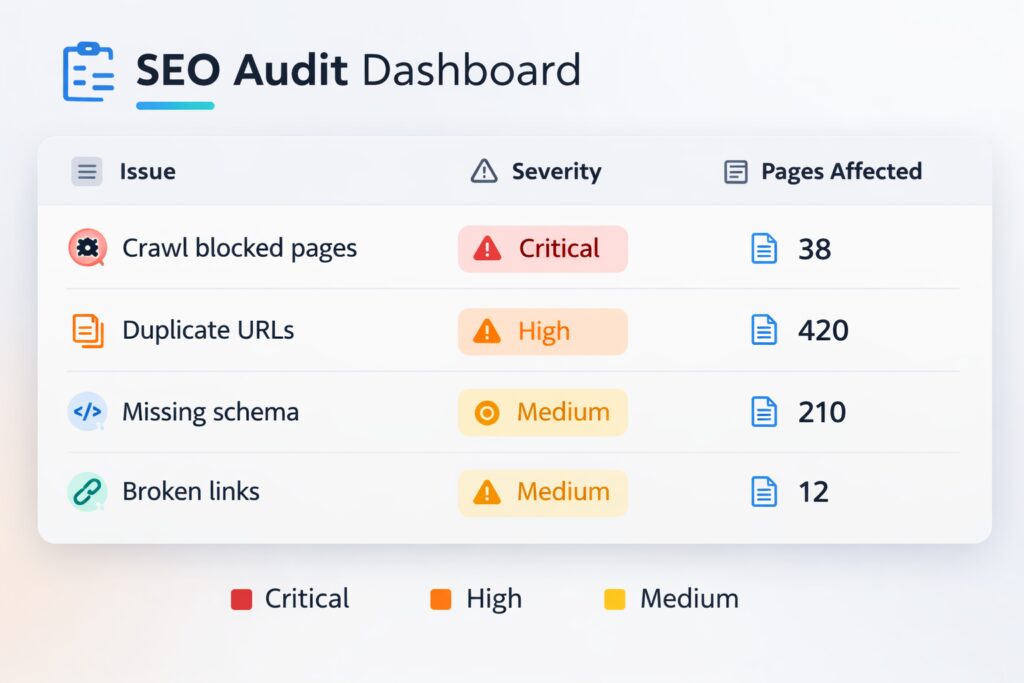
A well-structured technical SEO audit delivers:
- A prioritised issue list with severity ratings (critical, high, medium, low)
- Clear descriptions of each issue with the specific URLs affected
- Recommended fixes written in plain language, not just technical jargon
- An estimated impact rating for each fix (what resolving it is likely to improve)
- A summary section covering the most important actions to take first
An audit that produces 200 bullet points with no prioritisation is not useful. The output should tell you what to fix first and why.
What to Do With the Findings
Finding the issues is step one. Acting on them in the right order is what drives results.
As a general priority framework:
- Fix crawlability and indexation issues first. If Google cannot access your pages, nothing else matters.
- Address duplicate content and canonicalisation. This is typically the highest-impact fix for eCommerce stores.
- Resolve redirect chains and 404 errors to recover link equity.
- Implement or correct schema markup to improve rich result eligibility.
- Improve Core Web Vitals scores on key commercial pages.
- Strengthen internal linking to support category and product page rankings.
Not every issue needs to be fixed immediately. A technical SEO audit gives you a clear baseline and a prioritised roadmap, not an emergency.
If you want to understand the technical health of your eCommerce store, a structured audit is the starting point.
Alphamax Digital runs technical SEO audits for eCommerce stores as part of our broader SEO service. We cover every area outlined in this guide, prioritise findings by commercial impact, and provide a clear fix plan you can act on.
Book a call to discuss a technical SEO audit for your store.