Most store owners reach for a quick fix first. New product images. A banner change. A new plugin. It feels productive. But when the real problems are structural, patches just delay the inevitable.
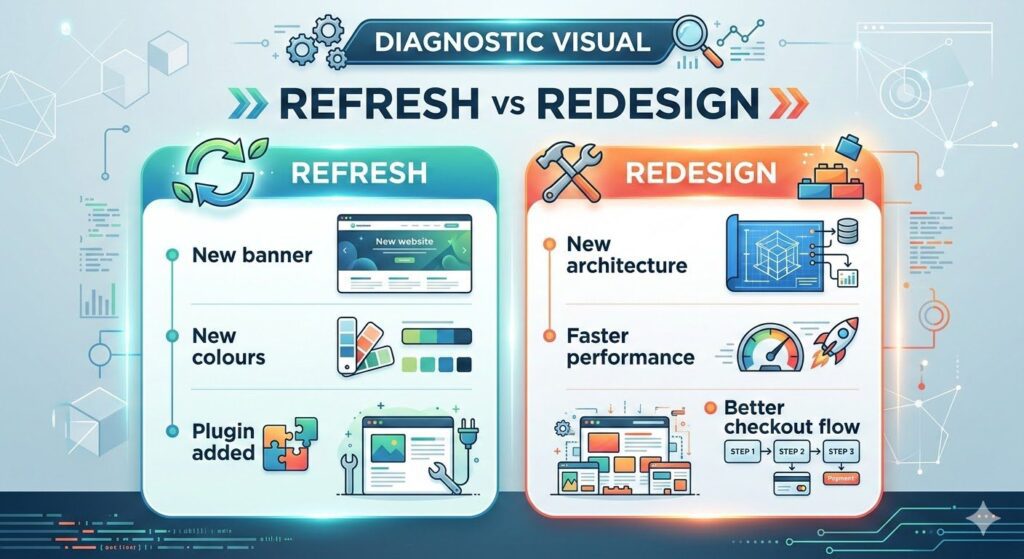
There is a difference between a refresh and a redesign. A refresh changes how your store looks. A redesign changes how it performs. If your store is losing traffic, leaking conversions, or costing more to maintain each month, the fix is not cosmetic.
This post covers the 7 signs your eCommerce website needs a proper redesign, what each sign actually costs you, and what a rebuild should deliver.
Quick Answer: When Does an eCommerce Website Need a Redesign?
An eCommerce website needs a redesign when structural problems are causing measurable performance loss. This includes slow load speeds, a checkout flow with high abandonment rates, poor mobile experience, outdated site architecture that blocks SEO progress, or a platform that limits your ability to scale without paying increasing fees. A redesign addresses the foundation, not just the surface.
Sign 1: Your Load Speed Fails Core Web Vitals Benchmarks
Speed is not a nice-to-have. Google uses Core Web Vitals as a ranking signal. A poor LCP (Largest Contentful Paint) score means your pages rank lower and load slower, two things that directly reduce traffic and conversions.
More importantly, customers do not wait. Studies consistently show that a one-second delay in load time reduces conversions by a measurable margin (verify specific figure against your own analytics baseline). On mobile, the drop is steeper.
If your store scores poorly on PageSpeed Insights and your team is applying plugin after plugin trying to claw back milliseconds, that is a sign the architecture itself is the problem. Plugins cannot fix a bloated theme or unoptimised hosting stack at the core level.
A redesign built with performance as a foundation, not an afterthought, will score better by default.
What to check:
- PageSpeed Insights score for your key category and product pages
- LCP, CLS, and INP scores in Google Search Console under Core Web Vitals
- Whether speed issues appear on specific page types or site-wide
Sign 2: Your Mobile Experience Is an Afterthought
More than half of eCommerce traffic arrives on mobile (verify with your own GA4 data). If your store was designed primarily for desktop and mobile was bolted on, the experience shows.
Truncated product images. Navigation menus that are hard to tap. Add-to-cart buttons buried below the fold. A checkout flow that requires pinching and scrolling. These are not small UX issues. They are conversion killers, and they compound over time as mobile usage increases.
Responsive design alone is not enough. A properly redesigned store is built mobile-first: the layout, the navigation structure, the checkout flow, and the page hierarchy all start from the smallest screen and scale up.
If your mobile bounce rate is significantly higher than desktop, or your mobile conversion rate is less than half your desktop rate, the structure needs rebuilding.
Sign 3: Your Checkout Flow Is Leaking Conversions
The checkout is the most important page on your store. It is where intent becomes revenue, or where it disappears.
High cart abandonment is often blamed on price or shipping costs. In many cases, the real cause is friction: too many steps, unclear trust signals, limited payment options, forced account creation, or a design that feels unreliable on mobile.
A refresh might add a new payment button. A redesign rebuilds the entire checkout logic from the ground up: field reduction, trust signal placement, progress indicators, guest checkout options, and mobile payment integration.
If your checkout abandonment rate sits above the 70 percent range (verify against your own data), that is a clear signal the structure is working against you.
Signals to look for:
- High drop-off between cart and checkout in your funnel reports
- Customer complaints about the payment process
- Low uptake of digital wallets if you have them enabled
- Repeat customers abandoning carts, not just new visitors
Sign 4: Your SEO Rankings Are Stalled or Declining
Traffic from Google is not automatic. It is earned through a combination of technical foundations, content structure, and on-page signals. If your store is technically broken, SEO cannot work regardless of how much content you publish.
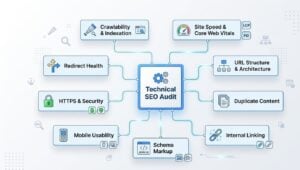
Common technical SEO issues that a patch cannot fix:
- Duplicate content generated by product variants or filter parameters
- Crawl budget wasted on thin or faceted URLs
- Missing or incorrect schema markup (no rich results in search)
- Poor internal linking that fails to distribute authority to your category and product pages
- Canonical tag errors causing self-competition in search rankings
A redesign addresses the architecture that SEO sits on. This includes the URL structure, the category hierarchy, the internal linking system, and the technical baseline that allows your content to rank.
If your organic traffic has plateaued or dropped over the past six months despite content and link building activity, the site structure is likely the constraint.
Sign 5: Your Site Architecture Cannot Support Growth
An eCommerce store that started with 20 products and now has 500 was probably not built for that scale. Category pages added manually over time, inconsistent URL structures, navigation menus that have grown into unwieldy dropdown stacks: these are signs of a store that has been stretched rather than planned.
Poor architecture creates real problems:
- Search engines cannot crawl and index pages efficiently
- Customers cannot find products without using the search bar
- Adding new product lines requires significant manual restructuring
- Site speed degrades as the product catalog grows
A properly designed eCommerce architecture plans for scale from the start. Categories are structured with depth and breadth in mind. Faceted navigation is handled correctly. Internal linking is systematic. This is not something you can retrofit with a plugin.
If adding a new product category feels like a project rather than a routine task, the underlying architecture is the problem.
Sign 6: Your Platform Fees Are Compounding
This sign applies specifically to stores running on hosted platforms where costs scale with revenue. If you are paying transaction fees on every order, plus monthly subscription costs, plus per-feature app charges, the cumulative cost of staying on that platform increases as your store grows.
For many store owners, the point arrives where the platform cost is extracting a meaningful percentage of margin. At that point, the question is not whether to move, but when and to what.
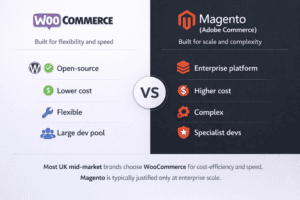
A redesign is the logical moment to also evaluate the platform. Moving to an owned stack, such as WooCommerce, eliminates transaction fees and removes dependency on a third-party platform for core business functionality.
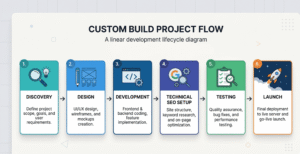
The redesign and the migration can be planned together, which reduces risk and avoids having to redo the same work twice.
If you have calculated your annual Shopify fees (including apps and transaction fees) and the number is larger than the cost of a proper rebuild, that is the sign.
Sign 7: Your Store No Longer Reflects Your Brand or Offer Range
This sign is often the most visible to customers but the last one store owners address. A store that was built three years ago with a limited product range and a different visual direction sends inconsistent signals to buyers who discover you through search or social.
Brand inconsistency is not just a design problem. It affects trust. Customers evaluating a purchase compare what they see on your store against what they saw on your social channels, your packaging, and your competitors. If the store looks like a different business, conversion rates reflect that.
Beyond aesthetics, a store that cannot clearly present your full product range, communicate your value proposition, and support your buying journey is structurally underperforming.
A redesign gives you the opportunity to rebuild the visual direction, the product hierarchy, and the content structure at the same time. The result is a store that works as a sales asset rather than a digital catalogue.
Ownership Benefits That Fuel Long-Term Growth
When a redesign is done correctly, the benefits extend beyond the visual layer. Here is what a well-executed eCommerce redesign delivers:
- Full platform control. No transaction fees, no feature restrictions, no dependency on a third-party roadmap.
- SEO foundation built in. Technical structure, URL architecture, schema, and internal linking configured from the start.
- Performance that scales. Load speed and architecture designed to handle catalog growth without degradation.
- Conversion-first checkout. A checkout flow built around reducing friction, not adding features.
- AI visibility readiness. Structured content and clear entity signals that help search engines and AI platforms interpret your brand accurately.
- Reduced maintenance costs. A clean codebase with no legacy plugin conflicts requires significantly less ongoing maintenance.
A redesign is not an expense. It is a structural asset that compounds over time.
If you recognised three or more of these signs in your store, a refresh will not fix the underlying issues.
The next step is a structured audit of your current store: technical SEO baseline, page speed analysis, conversion funnel review, and platform cost calculation. That audit tells you exactly what needs rebuilding and in what order.
Request a free Store Growth Audit from Alphamax Digital.
We review your current setup, identify the specific issues costing you traffic and conversions, and give you a clear plan for what a redesign should address.